Recent Posts

Considerations for Storage Tanks Nozzles Orientation

The function of a Storage Tank

A storage tank is one of the most important static equipment used frequently in tank farm areas to store liquids for further processing or use. They serve two important functions:

  1. Serves as a container to store fluids and
  2. Provide a pressure head for further distribution of the stored product.

For processing plants (refineries, chemical and petrochemical complexes, etc ), Storage tanks find their uses in several phases like

  • to store the feed (For example Crude Oil) before processing
  • to hold partially processed products and
  • to collect finished products.

In every plant, a number of storage tanks are used. Hence, a good arrangement of these storage tanks not only saves land space but also reduces the cost of a plant.

What is Nozzle Orientation?

Each tank has several nozzles to allow the Fluid in or out. All these nozzles must be arranged in a cost-effective efficient way such that they work smoothly without overloading the nozzle connections during operation. Proper nozzle orientation of storage tanks helps in reducing the maximum of operational problems. Good nozzle orientation is thus one of the most important activities in the piping layout and design stage.

Considerations for Storage Tank Nozzle Orientation

The number of tank nozzles is dependent on the operation and fluid handled. The orientation of each nozzle and providing platforms shall be considered together.

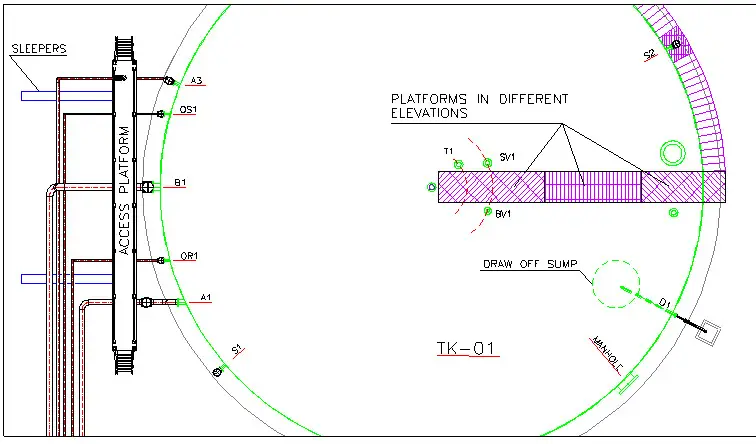
Normal practice is to collect body (shell) nozzles on one side of the tank and roof tanks in the same direction along with of roof platform (Fig 1). By this design, these nozzles and the valves, connected to each nozzle are easily accessible. Lesser platforms are required in such cases. Hence, the design is economic.

However, there are some exceptions like the tank manhole. It is better to locate the manhole in a different direction to other nozzles, the reason being easier entrance and exit.

A proper understanding of the fluid flow concept and nozzle performance helps the piping design engineer with better nozzle orientation design.

Sample of Nozzle Orientation
Fig. 1: Sample of Nozzle Orientation

Manhole of the Tank

Manholes are provided for frequent maintenance purposes. So it must have good access. It has to be provided based on the requirements set forth in the contract specifications. Locate manholes close to the dike accessway, far from the pipe way, and also accessible from the ground then operators can enter and exists easily.

Sealed and Vented manholes are to be provided at strategic points of the tank system when separate major groups of storage tanks, process blocks, and loading facilities are involved.

Two types of tank-shell maintenance access openings are used: the standard and the round opening. The large tanks or those that use internal heaters normally use the larger, oval-shaped, flat-bottom opening.

The access opening area must be kept free of any obstructions like large pipe supports, piping, and light poles.

Orienting the Input/output nozzles

The main process nozzles of a tank are input/output nozzles. The main point, where there is no other process requirement, is the minimization of pipe length (and so pressure drop). For example, sometimes it is required to locate these nozzles on different sides of the tank to mix fluid inside of the tank. Nozzle elevation also affects orientation; locating the elevated input nozzle and output nozzle in the same orientation vapor, which is soluted during the falling of liquid, will make gas traps in piping or cavitations in pumps. In Fig 1, A1 stands for the inlet and B1 for the outlet nozzle.

In Fig 1, A3 is the recycling or circulation nozzle used for circulating fluid via the outlet nozzle and pump then entering the tank through this nozzle, when the risk of freezing, choking or sedimentation of tank fluid exists. Consideration for the orientation of this nozzle is the same as the inlet nozzle.

Consideration for Tank Draw-off Nozzle

For Storage tanks in hydrocarbon services, to permit periodic draw off of water which normally collects in the product, an API low-type shell nozzle, and a drain valve are normally provided at the bottom of the tank. The water draw-off valve is normally positioned over an open concrete box with an outlet discharging into the gravity oily water collection system. For this nozzle, consideration of OSW lines is mandatory, to use less sump and pits in this system. In a group of tanks that are in one row, this nozzle can be located on the same side. In Fig 1, D1 is a draw-off nozzle.

Sampling Nozzles

A manual gauging-sampling well may be used where the stored product, is specified as a static accumulator. Gauge well shall be burr-free. If a manhole or a separate roof connection is used for gauging-sampling purposes it shall be located near roof support. All sampling valves shall be accessible and since valves are to be installed as close as possible to nozzles, so all nozzles shall be accessible. Normally, samples can be taken two liters per at 3 points at upper, middle, and lower levels daily. So, sample points are normally located at the grade, top platform, or along with the stair landings. In Fig 1, S1 and S2 are sampling nozzles to be accessible.

Level Nozzles

Minimum, one internal float level gauging instrument per tank, readable from grade consider. Other level gauges shall be readable and all their connection shall be maintainable, so nozzles are to be located along stairs.

storage tank
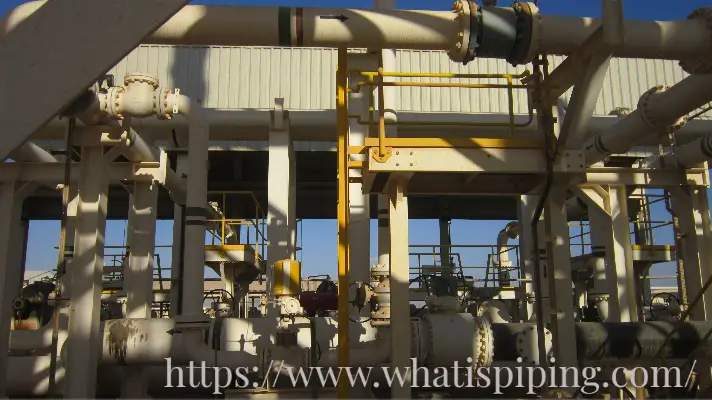
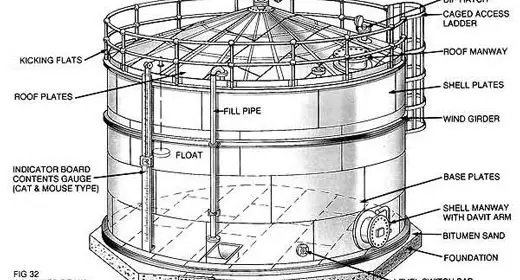
Fig. 2: Typical Storage Tank

Temperature Indication Connections

Connections for temperature indication shall be furnished for a flanged or threaded thermowell installation accessible for removal of the well and required space shall be considered in front of it. (Nozzle T1 in Fig 1)

Breathing and Safety Valves nozzles

Each tank has a minimum of one safety valve and one breathing valve, which is very important for tank safety during its life, installed on top of the roof shall be accessible from a platform. Also valves of an inert gas line which is connected to the tank for pressure balance when considered. In Fig 1, SV1 and BV1 are located close to the platforms.

Tank Mixers and heaters

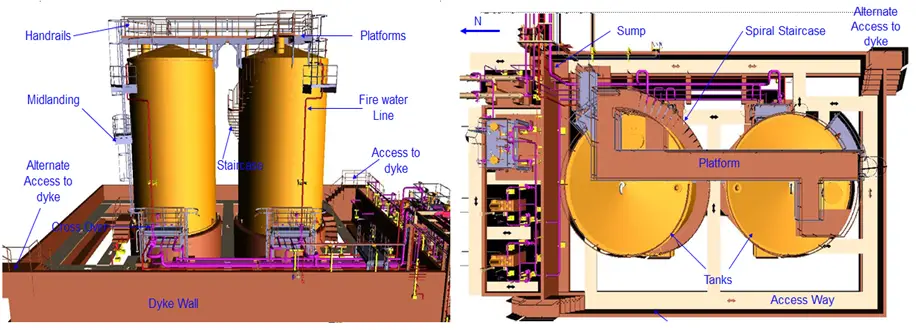
When on a tank, a mixer or a tube bundle heater is installed via a nozzle, orientation of it shall provide adequate area for removal and easy movement to the outside of the dike.

Fire Fighting Nozzles

Do not forget that fire water is never injected directly inside the tank, so the only nozzles are related to the foam system if existing. The most important point that shall be considered during the design of nozzle orientation for these systems is the number of nozzles and also the fact that nozzles shall be in a symmetrical arrangement to provide uniform coverage of foams.

Implementation of the above points in the design, will reduce the number of structural attachments to the tank and also the capital costs of the plant as well as operational problems and increase personnel safety.

Few more useful resources for you..

Articles related to Tanks
Articles Related to Pumps
Articles Related to Exchangers
Piping Design and Layout basics
Piping Stress Analysis Basics
Piping Materials Basics
Articles related to Process, Civil, Mechanical and instrumentation Design

About the Author: The author of this article is Mr. Amir Razmi, an International, a dynamic and multi-functional chemical engineer with 14 years’ experience in engineering and EPC of oil and energy projects from pre-contract activities to execution, and closeout. The author has added the above article as a part of his book “Storage Tank Farms Layout and Piping” which you can purchase by clicking here.

Pump Suction Intake Design with Sample Calculation

We all see pumps day in and day out. We see them in our houses, roadsides, industries etc. They are extensively used in adverse applications to transport fluids from one place to another.

What is a pump?

A pump is a mechanical device that moves fluids, solid wastes, chemicals, and slurries by mechanical action. The pump has two important components i.e. Flow & Head.

  • Flow: It determines the amount of fluid pumped.
  • Head: It tells the extent or distance to which fluid is to be exported.

There are two types of Pumps based on their operating principle.

  • Dynamic pumps: They are further classified as Centrifugal Pumps, Vertical centrifugal, Submersible pumps, etc.
  • Displacement pumps: They are further classified as Gear pumps, Piston pumps, Lobe pumps, etc.

As the pump works 24*7 in adverse environmental conditions, it has to be designed properly. Starting from NPSH(A) calculation to pipeline sizing calculation everything should be perfect. In this article, we will learn about “Pump Suction Intake Design Calculation.” The pump suction is designed as per the HIS (Hydrological Institute Standard). So, let’s see what the different terms are associated with pump suction design & how they are calculated.

Terms Associated with Pump Suction Intake Design

Bell Mouth

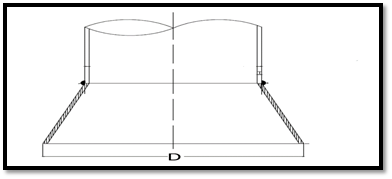
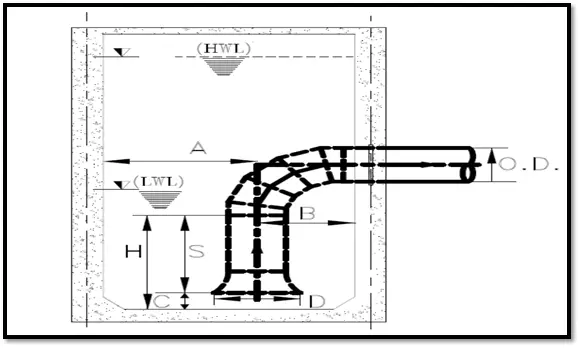
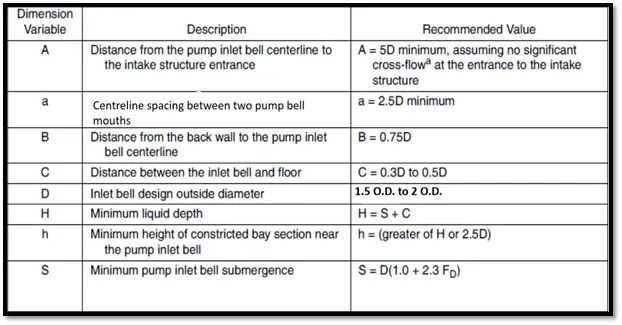
It is a piping structure that guides the intake of fluid to the pump.  Bell Mouth width is given by D. Width of the bell mouth is calculated as 1.5 to 2 O.D. of the suction pipe.

Typical Pump Bell Mouth Section
Fig. 1: Typical Pump Bell Mouth Section

End Wall Clearance (B)

It is the Clearance between the centreline of the pump suction intake bell and the end wall of the tank. It is calculated as 0.75D.

Centreline Spacing (a)

Centreline spacing between two adjacent pump bell mouths in the same tank will be calculated as 2.5D. This 2.5D is the minimum value.

Bell Mouth Floor Clearance (C)

It is the minimum gap that should be maintained between the bell mouth bottom and the top of the tank floor. It is calculated as 0.3D to 0.5D.

Minimum Submergence (S)

It is the minimum submergence of the pump bell inlet in water. This is calculated as D (1.0 + 2.3FD). Where FD stands for Froude’s number.

Minimum tank width (A)

This is the minimum distance between the pump bell centreline and the next pump wall. It is given by 5D.

Minimum Liquid Depth (H)

It is the minimum liquid depth required in the tank. This is given by the submission of Minimum submergence(S) + Bell Mouth Floor clearance(C). The lowest water level intake is calculated by minimum liquid depth.

The angle of floor slope (α)

This is the slope of the floor required in the tank. Generally, the floor is sloped so that an adequate amount of water is always available near the pump suction.

Typical Pump Suction Cross section
Fig. 2: Typical Pump Suction Cross section
Suction Design Parameters
Table-1: Suction Design Parameters

Impacts of Improper Design

  • Cavitation
  • Pump Dry Run
  • Improper process parameters
  • Improper calculation of NPSH(Available)
  • Increase in OPEX.
  • Vibration in pump body & suction piping
  • Pump Head Loss

The pump suction should be designed considering the above-mentioned parameters. If the suction of the pump is not designed properly there may be problems like cavitation, pump dry run, the problem of priming, etc. So, if you don’t want that these problems to be part of your real life & you want your OPEX to be the least these design considerations should be followed carefully while a pump system is being designed.

Typical Calculation of Pump Suction Intake Design

Consider a pump of flow Q = 1640m3/hr.

  • Pump suction bell design (D) = 1.5* O.D. of pipe

To Calculate the Diameter of the Pipe: Q = A.V. 

Where

  • A = Cross-section area of Pipe or (A=π/4 * D2)
  • V= Velocity in pump suction side (velocity in the suction pipe is generally considered in the range from 06 to 1.5m/s.

Minimum submergence (S): S = D (1+2.3Fd)

Where

  • Fd = Froudes Number (It is a dimensionless number)
  • FD = V/(gD)^0.5
  • V = Velocity in m/s
  • D= Suction bell diameter
  • g = Gravitational acceleration i.e. 9.81 m/s^2

Minimum sump clearance (C)= 0.3 to 0.5D

Lowest water level (H) = S+C

The gap from the centre of the wall to the pipe centre (B)= (0.3D to 0.75D)

Flow(m3/hrInside Diameter(m)Outside diameter(mm)Bell design D) (mm)Velocity(V)(m/s)Froudes Number (FD)Minimum submergence(S) (mm)Minimum sump clearance (C)  (mm)Lowest Water level (H) (mm)Gap of pipe from the centre wall (B) (mm)
16400.6957111066.51.200.371197832022971386
Table 2: Table Showing Results of Sample Calculation

Tutorial Video for Pump Suction Intake Design

For more clarification watch the below-attached video & subscribe to our channel

Few more Useful Resources for you.

Other Pump Related Articles
Piping Design and Layout Basics Related Articles
Piping Stress Analysis Related Articles
Piping Material Basics
Articles Related to Process Design Basics
Articles related to Civil Design Basics
Articles Related to Mechanical Design Basics
Articles Related to Instrumentation Design Basics

Water Pumping Station Piping Stress Analysis using Flexible Sleeve Coupling

A large number of Piping failures in Very Large Diameter Water pump piping systems forced client companies to consider water pump station piping as a critical system. Pump station piping is normally very compact due to space constraints and the possibility of including any inherent piping flexibility by adding elbows is limited. At the same time, the Very Large size (diameter) of the suction and discharge piping makes the system highly rigid. In this scenario, piping stress engineers are left with only two options to qualify the pump suction and discharge nozzles.

  1. Using Expansion Joint
  2. Using Flexible Sleeve Couplings

Both methods provide flexibility in the system and are highly effective in absorbing thermal movements in the system.

But The main drawback with Expansion Joints is their high cost with respect to design life and the requirement of additional standby expansion joints. So in recent times, design consultancies are using Flexible Sleeve Couplings to a large extent. Compared to the expansion joints, flexible sleeve couplings are economic for their design life.

In this article, We will describe the stress analysis of a Water Pump Station Piping employing Flexible Sleeve Couplings. Hexagon PPM software Caesar II is used for analysis.

Flexible Sleeve Coupling
Fig. 1: Flexible Sleeve Coupling

What is a Flexible Sleeve Coupling?

The Flexible Sleeve coupling (Fig. A) comprises a center sleeve located between two end rings. The sleeve and end rings are separated by wedge-shaped elastomeric gaskets. The tightening of the head bolts draws the end rings together, thus compressing the gaskets between the end rings and the center sleeve. As the gasket is forced onto the pipe surface, an effective leak-proof seal (Fig. B) is achieved. Such flexible couplings are capable of absorbing thermal expansion and contraction removing the need for expansion bellows (Fig. C).

Additionally, it has the ability to accommodate enough angular deflection to allow for pipeline movement or ground settlement, or to provide for long radius curves without the necessity of incorporating purpose-made bends (Fig. D).

Stress Analysis System Definition

The Stress Analysis system consists of a Water Pump station consisting of four pumps and two future tie-ins. The line parameters are given below for reference:

Pump suction and discharge side line parameters
Fig. 2: Pump suction and discharge side line parameters.

Data required from the Vendor

The following data need to be collected from the Vendor

  • Flange and Valve weights.
  • SIF values at branch connections.
  • Pump GA drawing with Nozzle Allowable loads.

Modeling the Stress system

Refer to Fig. 3 to visualize the complete system.

Water Pump Station Piping under Consideration
Fig. 3: Water Pump Station Piping under Consideration

The Governing code for the system is ASME B31.4. Pipe elements are modeled in the same conventional way. A fixed anchor is considered at the interconnection of buried and aboveground parts for the discharge header. The pump is modeled as rigid with zero weight.

The piping pressure thrust force is calculated as Pressure X Internal Cross-Sectional Area and added in direction changes.

Modeling the Flexible Sleeve Coupling in Caesar II

  • In Caesar II, the sleeve coupling (Fig. 4) is modeled as an expansion joint with very low stiffness values.
  • Effective ID is left blank as the sleeve coupling is used with a harness (tie rod) so no need to calculate coupling thrust force.
  • Axially a displacement of 20 mm is considered as the coupling can absorb a displacement up to 20 mm (Need to be checked with the vendor on a case-to-case basis).
  • An all-around guide is provided on both sides of the sleeve coupling at the nearest possible distance from the coupling.
  • Refer to Fig. 4 for more details.
  • The Flexible sleeve coupling (Fig. 5) is modeled by elements 6620-6630; 6620-6640; At nodes 6580 and 6660 all-around guides are provided to avoid bending of the coupling. At node 6630 a 20 mm displacement is provided for axial movement.
Modeling of Flexible Sleeve Coupling in Caesar II
Fig. 4: Modeling of Flexible Sleeve Coupling in Caesar II
Typical harnessed flexible sleeve coupling
Fig. 5: Typical harnessed flexible sleeve coupling

Load Cases for Analysis

Load cases are prepared considering 3 pumps as operating and one pump as stand-by. Refer to Fig. 6 for the analysis load cases. Seismic loads are considered to act in any single direction.

Load cases considered for analysis
Fig. 6: Load cases considered for analysis

Few more Useful Resources for You..

Stress Analysis Basics
Stress Analysis using Caesar II
Stress Analysis using Start-Prof
Piping Design and Layout basics
Piping Materials Basics

Importing an Autodesk REVIT model into Piping Stress Analysis Software START-PROF

What is Autodesk REVIT

Autodesk REVIT is modeling software used mainly by Mechanical, Civil, Architectural engineers and designers. It offers a collaborative and multi-disciplinary approach for design and construction projects. Using this software, Engineers can produce a detailed model of plants, buildings, and infrastructure. REVIT offers features of work-sharing between interface disciplines and saving the work. It helps project teams to reduce costs and achieve better outcomes.

The Stress Analysis Software PASS/START-PROF provides an import feature so that the model can be directly imported into PASS/START-PROF and can be used as analysis input. This feature not only helps in reducing modeling time but also removes man-made modeling errors completely.

This video shows, how to import a piping model from Autodesk REVIT into PASS/START-PROF Piping Stress Analysis Software.

Import Autodesk REVIT

What is PASS/START-PROF

PASS/START-PROF is a part of the powerful and integrated PASS Suite:

  • PASS/START-PROF for piping system stress analysis of any size and complexity
  • PASS/EQUIP for pressure vessel design and analysis
  • PASS/HYDRO SYSTEM for piping systems fluid flow analysis of any size and complexity
  • PASS/NOZZLE-FEM for nozzle flexibility and stress analysis, SIF and k-factor calculation for tees not covered by ASME B31 codes (lateral, D/T>100, etc.)

Methods for Importing Autodesk REVIT into PASS/START-PROF

Export from Autodesk REVIT can be performed using a special plug-in for Autodesk REVIT. Export can be done in two steps:

  1. Select Revit to START-PROF plugin, select piping, export into START-PROF neutral format file
  2. Open START-PROF and open neutral format file

Video Tutorial to Import Autodesk REVIT Model into PASS/START-PROF

Few more useful Resources for You..

Stress Analysis using Start-Prof
Stress Analysis Basics
Stress Analysis using Caesar II
Piping Design and Layout Basics
Piping Materials Basics

How to import an AVEVA E3D or PDMS model into START-PROF Piping Stress Analysis Software

What is AVEVA E3D

E3D and PDMS are some of the frequently used plant design software developed by AVEVA.

The Stress Analysis Software Start-Prof provides import and export features that are included in standard software packages with no extra charge. Along with reducing modeling time, this feature helps in removing the man-made modeling errors completely.

This video tutorial shows the step by step procedures to import a piping model from AVEVA E3D or PDMS software into PASS/START-PROF Piping Stress Analysis Software.

Import from E3D to Start-Prof

What is PASS/START-PROF

PASS/START-PROF is a part of the powerful and integrated PASS Suite software module which is used for piping stress analysis.

Methods for Importing AVEVA E3D or PDMS Model into PASS/START-PROF

A special plug-in is available for AVEVA E3D and PDMS that allows the import of piping models and partially export of data back to AVEVA. The plugin is free and included in the standard START-PROF package.

Export and import can be done in three steps:

  1. Run START-PROF and AVEVA E3D or PDMS on the same machine
  2. Select the piping branches in AVEVA E3D or PDMS and click export to START-PROF. The model will be automatically created in START-PROF
  3. Modify the model in START-PROF and click Import changes from START-PROF in AVEVA E3D or PDMS. The changes will be imported back

Video Tutorial to Import AVEVA E3D or PDMS model into START-PROF

This video was provided by Modelosoft company, the PASS/START-PROF and AVEVA dealer in Mexico.

Few more Resources for You..

Piping Stress Analysis using Start-Prof
Piping Stress Analysis Basics
Piping Stress Analysis using Caesar II
Tutorials related to Piping Design Software

How to import a CADWorx model into START-PROF Piping Stress Analysis Software

What is CADWorx

CADWorx is one of the frequently used plant design software developed by Hexagon. It creates a semi-intelligent model using a specification based application.

Since this software is widely used for plant design, creating an interface with CADWorx with START-PROF is highly beneficial. The Stress Analysis Software Start-Prof provides an import feature so that the model can be directly imported into Start-Prof and can be used as analysis input. This feature not only helps in reducing modeling time but also removes man-made modeling errors completely.

This video shows, how to import a piping model from CADWorx into PASS/START-PROF Piping Stress Analysis Software.

Importing Piping Model from CADWorx to START-PROF

Features of Start-Prof

PASS/START-PROF enabling new users to perform piping systems analysis of any size or complexity in days rather than months. In PASS/START-PROF users can start working immediately, with minimal experience. Companies can put PASS/START-PROF into application immediately after purchase, significantly reducing costs in time saved without compromising on the quality of end results. Even a beginner can deliver good quality pipe stress analysis using PASS/START-PROF with minimal training and guidance.

In PASS/START-PROF, since you will be working with a modern object model, everything is easy and straightforward. Creating piping components like a pipe, bend, reducer, cap, tee, expansion joint, restraint, valve, flange, etc are very simple. Perfect Node numbering as found in other stress analysis software will not bother you. Modifying the created model using copying, rotating, mirroring, node renumbering, cut, copy, paste functions from menubar is quite easy.

Method-1: Importing CADWorx Model into Start-Prof using PCF file

There are several methods of how to import the CADWorx model. In this video, we will show the first method using the PCF file.

Export can be done in three steps:

  • Select the piping in CADWorx and export it into PCF file
  • Open PASS/START-PROF and convert PCF file into CTP file
  • Open CTP file in START-PROF

Video Tutorial to Import CADWorx Model into START-PROF: Method 1-Using PCF File

This video was provided by AECSoft company, the PASS/START-PROF dealer in China.

Method-2: Importing CADWorx Model into Start-Prof using Caesar II Neutral file

There are several methods of how to import the CADWorx model. In this video, we will show the second method using the CAESAR II Neutral Format File.

Export can be done in three steps:

  1. Select the piping in CADWorx and export it into CAESAR II
  2. Convert CAESAR II file into neutral format file
  3. Open neutral format file using PASS/START-PROF

Video Tutorial to Import CADWorx Model into START-PROF: Method 2-Using Caesar II Neutral File

This video was provided by AECSoft company, the PASS/START-PROF dealer in China.

Few more Resources for You..

Piping Stress Analysis using Start-Prof
Piping Stress Analysis Basics
Piping Stress Analysis using Caesar II
Tutorials related to Piping Design Software