Expert opinion says that among all piping design issues, 20% of issues are directly related to the support design and the other 20% are indirectly related. So overall 40% of the problems in the piping design are related to pipe support. Hence pipe support design is one of the most important aspects of piping design and should be considered an integral part of it. Spring hangers or pipe hangers are very useful piping supports for Critical piping systems. This article will provide some useful insights into Spring Hanger Selection Procedure. Towards the end of the article, Link for a Recorded Webinar on the above Subject by Technology major, Bentley is provided for further insight.
What are the different types of pipe supports?
There are different types of supports that are used in Piping Design. Depending upon the application, those can be roughly divided into load-bearing supports, restraints, and vibration absorbers.
- Load bearing and hanger supports are used to carry the weight of the piping system. Simple resting support and hangers.
- Restraints restrict the movements due to thermal and dynamic loads acting in the piping system. Guides, line stops, and anchors fall under this category.
- Guide restricts lateral and vertical movements and allows axial movements, whereas line stops (or axial stops) restrict axial and vertical movements and allows lateral movements.
- Pipe Anchor support prevents all movements in all directions.
- Vibration absorbers like Snubbers, Sway braces, Hold Down, etc restrict the movements due to vibration caused by wind, earthquake, fluid flow, and other dynamic loadings
- All the above support may be used as single support or in a combination.
Requirements for Spring Hanger Supports
The most economical and efficient way to support the piping is to simply rest the piping on a rigid support structure. Being supported with rigid supports, the pipe will either generate a potentially huge upward force when the pipe expands downward or leave the support inactive i.e. lifting off when the pipe moves upwards. This is the case where stress engineers suggest using spring hanger support
Whenever rigid supports in the system are not taking load due to their thermal movement or rigid support may cause an overloading effect to equipment connection, spring hanger pipe supports are used to share some of the loads and to keep the piping system safe without affecting expansion stresses. We can understand this scenario with a simple example here. Refer to Fig. 1. This piping system of a pipe size of 6 inches (150 NB) is connected to a nozzle on a horizontal vessel. To sustain the weight of the system, we have added two resting support in between and an anchor at the end.
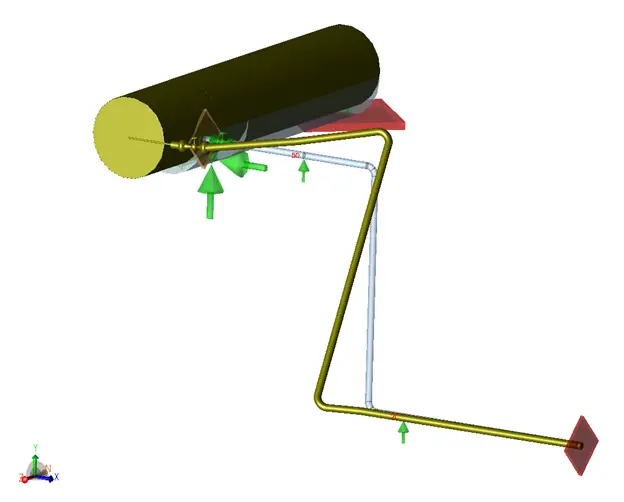
Now the total weight of the piping system is shared by four supports, an Equipment nozzle, two resting support, and an anchor.
Let’s assume that this piping is operating at a temperature of 200 deg C and a pressure of 4 bar. Due to thermal expansion, the vertical piping leg expanded in the vertically up direction (as it won’t expand in a downwards direction due to the support at node 20), and support at node 50 near the nozzle lifts off. In this case, the total piping weight is now shared by 3 supports only, the Equipment nozzle, and only 1 resting support (Node 20) as the other one (Node 50) is lifting off and anchored. This may cause overloading of the equipment nozzle.
In such a situation, Spring hanger pipe support comes into the picture. The support at node 50 can be replaced with a spring hanger support to take piping load during operating conditions without affecting expansion stresses too much. In simple words, We can say that the spring hanger is taking the weight of the piping system allowing thermal movements.
Functions of a Spring Hanger Pipe Support
Hence, the main objectives or functions of the hanger supports are as follows:
- To provide necessary weight support to balance the piping system during the complete operating cycle.
- To permit the operational movement of the pipe as it goes from cold to hot or vice versa.
- It does not cause excessive expansion stresses in the pipe as the spring load changes from cold to hot or vice versa.
- Sometimes, Spring hangers can be used to dampen piping vibration as well.
The selection of the appropriate type of hanger support for any given application is governed by the individual piping configuration and job requirements.
Types of Spring Supports
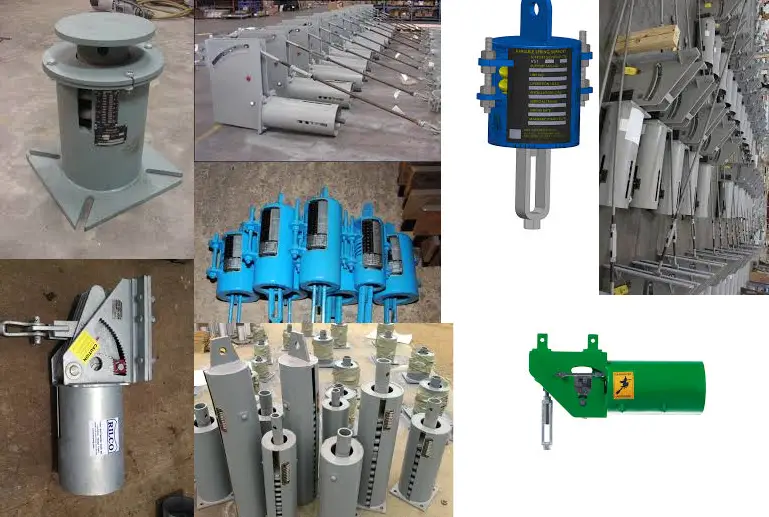
There are two types of spring hanger supports available in the market; Variable Spring Hanger and Constant Spring Hanger.
Variable Spring Hanger Support
In variable spring hangers, supporting force varies with piping displacements. Piping vertical thermal displacements cause extension or compression of the spring which changes the actual support effect of the spring. There is variation in supporting force as the load varies from cold to hot conditions. This variation should not exceed a certain limit.
The arrangement for these is very simple with single or series of springs attached to piping and both piping and spring are on the same axis. These springs can be installed in small spaces, and are relatively inexpensive, but load varies so this can be a drawback with large displacements.
Constant Spring Hanger Support
Unlike variable hanger support, Constant Spring Hanger support provides constant supporting force throughout the displacement range. Constant hanger supports are provided with lever and cam arrangement. Changes in piping displacement are balanced by the moment produced due to the cam and lever.
As a result, the resisting force provided by this spring support is independent of position during its travel and approximately constant throughout its range. Typically, the variation of the active and reactive forces is very small.
Constant Effort spring shall be selected where you have excessive vertical movements, where it is necessary to restrict the transfer of load from the displacing spring adjacent terminal of equipment, or where the Spring variability is exceeded.
These are more expensive supports but are ideal for conditions where pipe movements are large and the sensitivity of equipment is important. They also have different types for different applications
Variable spring hanger support terminologies
Variable support is essentially a spring, or series of springs, in a container used to support piping loads above or below piping. As already mentioned, in variable spring hangers, supporting load varies with piping displacement and there is load variation from installed condition to operating condition.
When the installed load is applied, the spring is compressed by some distance as per spring stiffness. This is also called a Cold Preset.
Piping thermal displacement produces a deflection in the spring which further adds differential load on the spring. Depending upon the direction of the thermal displacement, the spring may further compress Or expand.
If the pipe moves upwards the spring will expand to subtract differential load from the cold preset load to get operating or hot load. On the other hand, If the pipe moves downwards spring will further compress to add a differential load with the cold preset load to get the operating load.
This differential load is nothing but the difference between the installed load and operating load i.e. Cold load and hot load. This differential load is also a function of spring deflection and can be calculated as Spring stiffness x Thermal displacement
Hot load – Cold Load = Spring Stiffness x thermal movement
This can also be written as
Cold Load (CL) = Hot Load (HL) +/- Spring rate x thermal displacement.
If the pipe moves upwards, the cold load is more than the hot load and if the pipe moves downwards cold load is less than the hot load.
In order to minimize the stress variation, the differential load for given variable spring support is limited to a maximum of 25% percent of the operating load or hot load as per industry standards.
We can write this in mathematical form as
Variation = (HL – CL) / HL <25 %, Which is also written as Variation = Spring rate x thermal displacement / HL <25 %
This means that, regardless of the pipe movement, the spring will carry no more than 125% and no less than 75% of the properly balanced portion of the load.
Rigid hanger criteria
We often come along with this terminology during spring hanger selection.
Consider a case in which a spring hanger is provided exactly near the equipment nozzle and there is a requirement to consider this extra weight for the nozzle flange and hardware.
In such a case, the hanger is released at anchor. In this particular direction, support is removed for the hanger selection procedure and there will be more weight used in the selection process for spring to simulate disconnecting equipment
The spring is designed for higher weight and has the capacity to carry this extra weight of equipment
Hot and cold load design
Loads of a spring hanger change throughout the operating cycle. By setting the pre-operation cold condition load at a certain level, we can predict the load at operating conditions based on the expected vertical displacement. And load variation is calculated as spring rate times the vertical displacement.
The load that balances the weight of the portion of the supported piping is called the balanced load.
Ideally, we like to set the balanced load at the midway of the operating cycle, so we can shift one-half of the load variation to the cold condition and the other half to the hot condition.
Practically this is not possible as the piping system is either hot-balanced or cold-balanced.
Hot balance vs Cold balance
In hot load design, the balanced load i.e. weight of supported piping is selected as hot load whereas, in cold load design, it is selected as cold load.
Hot balance sets the hanger in such a way that the spring load at hot operating conditions equals the balanced load. Theoretically, this is the preferred approach because it minimizes load and sustained stress at the most important hot condition.
This is a must used for piping operating at creep range, where creep damage depends largely on sustained stress at operating condition
Cold balance sets the hanger force to balance the weight load in cold conditions. This leads to some unbalanced force at the operating conditions when the piping is at hot operating conditions. Theoretically, this approach is not as good as the hot balance option.
Those field engineers who represent large types of machinery such as compressors, tanks, and turbines operating at low to moderate temperatures, insist to use cold balance springs on the piping systems attached to their equipment
This often creates arguments between the machinery/site engineer and the piping stress engineer to use spring load design.
Cold balance is very popular in the field as during the installation process, the spring cold load is in balance with the weight of the portion of the piping being supported and this may resolve alignment issues for equipment nozzles
but somehow this does not yet capture the attention of stress engineers
If we know the rationale behind the equipment engineer’s insistence, the job can be better handled avoiding friction between the design and installation team
Spring hanger Support Manufacturer
There are different spring hanger manufacturers available in the market like Lisega, Piping Technology, and Products, Anvil, Carpenter & Patterson, etc. and the stress engineer has to select a spring hanger manufacturer as per project specifications.
In AutoPIPE, one can select spring hangers from 27 different spring hanger manufacturers while Caesar II provides 30 different manufacturers in their Database.
Recorded Webinar on Spring hanger Selection Procedure using AutoPipe
Bentley conducted a webinar for a detailed explanation of the Spring Hanger Selection Procedure using AutoPipe software on Wednesday, April 29, 2020, at 10:00 AM India Standard Time. If you need clarification regarding spring hangers, Simply Click Here to Access the Recording of the Webinar.
The above webinar briefly explained the following points:
- Need for Spring Hanger Support in piping
- Standard Hanger Selection Procedures – Hot load and cold load
- Spring hanger selection and analysis in AutoPIPE
Online Video Courses on Piping Support
To learn more about piping support design and engineering you can opt for the following video course.
Few more useful Resources for you…
Technical and General requirements for Spring Hangers while purchasing.
TBE of vendor Spring hangers: Main points to consider before placing an order
Spring hangers: Common Interview Questions with Answers
Spring hanger selection and design guidelines for a Piping engineer using Caesar II
Basics of Pipe Stress Analysis